[FIN]CROSS-BORDERVOL: $4.2T
[SEC]CYBER ALERT: TIER2
[POL]IS0 GROWTH:+14%
[GEO] CLOUDINDEX: +2.4%
Structural Logic
Category Filters
Who Should Use an Interactive Kiosk First?
Lead Author
Published
Views:
As digital transformation reshapes every industry, the best answer to who should use an interactive kiosk first is usually not “everyone.” In most real-world deployments, the first users should be the people who create the fastest operational learning with the lowest adoption risk: frontline staff, guided first-wave customers, or high-frequency users in simple service scenarios. Starting with the right group improves kiosk usability, shortens training time, protects payment and data workflows, and helps organizations scale with fewer mistakes. For information researchers and operators, the practical question is not just who can use a kiosk first, but who should use it first to deliver secure, efficient, and measurable service outcomes.
Who should use an interactive kiosk first in most deployments?
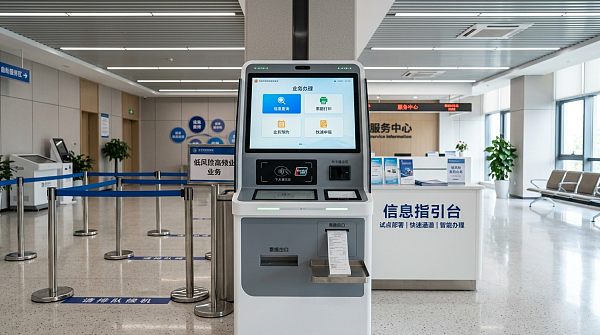
In most industries, the first users of an interactive kiosk should be one of these three groups:
- Frontline operators or staff-assisted users during the launch phase
- Returning users with simple, repeatable tasks such as check-in, payment, queueing, or information lookup
- Users in low-risk service journeys where errors are easy to correct and support is nearby
This is the most practical rollout order because interactive kiosks are not only hardware terminals. They are part of a wider service system that may include Smart POS integration, payment gateway connections, customer identity steps, data privacy controls, and operational maintenance. When companies begin with the wrong audience—for example, first-time users facing complex transactions without support—adoption slows and the kiosk may appear ineffective even when the technology itself is sound.
So the short answer is this: start with the user group that has high transaction volume, clear task intent, and access to human support if needed. That creates the best conditions for testing workflows, reducing friction, and improving the kiosk before wider deployment.
Why not start with all users at once?
Many organizations assume broad access means faster return on investment. In practice, launching an interactive kiosk to all user groups at once often creates avoidable problems:
- Too many different user behaviors to evaluate clearly
- Higher support demand on operators
- Greater risk of failed payments or incomplete transactions
- More privacy and consent issues if the workflow handles personal data
- Difficulty identifying whether low performance comes from interface design, training gaps, or unsuitable user targeting
A phased approach is usually more effective. It allows teams to validate usability, payment flow stability, accessibility, compliance safeguards, and queue management before expanding to more complex user groups. This is especially important in sectors where kiosks connect to customer records, transaction systems, or regulated environments.
Which user groups make the best first-wave kiosk users?
The strongest first-wave users depend on the service model, but several patterns apply across industries.
1. Staff members and operators
Internal users are often the best starting point. They understand the service process, can identify failure points quickly, and can explain common user questions. If operators use the kiosk first, organizations gain operational insight before exposing customers or visitors to an unfinished experience.
This approach is especially useful when the kiosk is connected to:
- Smart POS systems
- Payment gateway infrastructure
- Ticketing or queue management software
- Identity verification workflows
- Cloud-based reporting dashboards
2. Repeat users with simple needs
People who already know the service and need only a few predictable actions are excellent first users. Examples include repeat retail customers making standard payments, office visitors checking in, patients confirming appointments, or students accessing campus services. Their familiarity reduces confusion and produces more reliable feedback.
3. Digitally comfortable users in guided environments
If the kiosk is customer-facing from day one, begin with people who are likely to adapt quickly and who can access nearby support. A guided environment matters because staff can intervene if the interface is unclear or if the transaction fails.
4. High-volume, low-complexity transaction users
These users help organizations measure real performance quickly. If many people use the same kiosk function repeatedly, teams can improve speed, screen flow, transaction success rate, and uptime with meaningful data.
When should first-time or non-technical users come later?
First-time users, elderly users, or non-technical users should not automatically be excluded, but they often should not be the very first audience unless the kiosk is intentionally designed for universal accessibility and the workflow is extremely simple.
These groups may face challenges such as:
- Unclear navigation patterns
- Difficulty understanding icons or multi-step forms
- Longer decision times at payment or verification stages
- Accessibility needs involving font size, audio, height, or touch sensitivity
- Hesitation around privacy, card usage, or consent
If these users are expected to become major kiosk users later, the better strategy is to first test with easier groups, improve the interface based on observed behavior, and then expand with accessibility and support measures in place.
How should operators decide the right first users?
For operators and project teams, the decision should be based on service risk and usability, not assumption. A practical evaluation framework includes five factors:
Task simplicity
Can the user complete the kiosk journey in a few clear steps? The simpler the task, the better it is for first-phase rollout.
Error recoverability
If a user makes a mistake, can the process be corrected quickly without financial, legal, or customer-service consequences?
Support availability
Is a trained staff member nearby to help? Staff-assisted deployment dramatically improves first-stage adoption.
Transaction sensitivity
Does the kiosk process payments, identity data, health information, or regulated records? High-sensitivity use cases require stronger controls before broad use.
Feedback quality
Will this user group provide clear signals about what works and what fails? Good first users help teams refine the system faster.
If a group scores well across these areas, they are often a strong candidate for initial kiosk adoption.
What does this mean for payments, compliance, and service quality?
Choosing the first kiosk users affects more than convenience. It directly influences operational reliability and governance outcomes.
Smart POS efficiency
If the first users are operationally suitable, Smart POS workflows can be tested under realistic but manageable conditions. This helps teams identify checkout delays, screen bottlenecks, hardware issues, and integration errors before scale increases.
Payment gateway performance
Kiosks handling card, mobile wallet, or cross-border payments need stable transaction pathways. Using guided first-wave users lowers the chance of payment abandonment and helps operators verify timeout behavior, retry logic, receipt generation, and exception handling.
GDPR compliance and privacy controls
If the kiosk captures personal data, the first deployment group should be selected carefully. Operators need to confirm consent messaging, data minimization, retention rules, and screen privacy. Early-stage testing with controlled user groups reduces regulatory and reputational exposure.
Market penetration and adoption confidence
Successful early adoption creates proof that supports wider rollout. If the first users complete transactions smoothly and report positive experiences, organizations can expand with stronger confidence and better positioning in competitive markets.
Industry examples: who should use an interactive kiosk first?
Because this topic applies across industries, here are practical examples:
- Retail: start with repeat customers using self-checkout for a limited product set, with staff close by
- Banking and FinTech: start with staff-guided users performing simple account service or queueing tasks, not complex financial transactions
- Healthcare: start with appointment check-in users rather than patients needing detailed data entry
- Education: start with students using common campus functions such as attendance, directions, or printing
- Hospitality: start with loyalty members or pre-booked guests for express check-in
- Public service: start with information lookup or ticketing, not multi-document application workflows
In each case, the first users are chosen because they combine predictable intent with manageable complexity.
Common mistakes when choosing first kiosk users
Organizations often slow adoption by making one of these mistakes:
- Starting with the most complex service journey
- Assuming all users are equally digitally confident
- Ignoring operator feedback during early deployment
- Launching payment features before edge cases are tested
- Overlooking accessibility and privacy concerns
- Judging kiosk success too early, before workflows are refined
A better approach is to treat the first user group as a strategic pilot audience, not just an available audience.
What should operators do before expanding kiosk access?
Before moving from first users to broader adoption, operators should confirm that the kiosk performs well in actual service conditions. A simple readiness checklist includes:
- Completion rates are consistently high
- Support requests are declining
- Payment and receipt functions are stable
- Screen flow is easy to understand
- Accessibility basics are in place
- Privacy notices and consent steps are compliant
- Hardware uptime and cleaning or maintenance routines are manageable
Only after these basics are validated should the kiosk be introduced to broader or more complex user groups.
Conclusion
If you are asking who should use an interactive kiosk first, the most useful answer is: start with the user group that offers the clearest path to reliable learning, safe transactions, and operational control. In most cases, that means frontline staff, guided users, or repeat users with simple tasks—not the entire public at once. This approach improves Smart POS efficiency, supports payment gateway stability, reduces GDPR compliance risk, and builds a stronger foundation for wider market penetration. For researchers and operators alike, the goal is not only to deploy a kiosk, but to deploy it in the right order so adoption is measurable, scalable, and genuinely useful.
Tags
Recommended for You
 How to evaluate medical kiosk touch responsiveness with glovesEvaluate medical kiosk touch responsiveness with gloves. Learn how to test accuracy, latency, and false touches to compare suppliers and choose a reliable kiosk.Oct 26, 2026Dr. Hideo Tanaka
 DigitalXForce Continues Global X-ROC Rollout for AI-Driven Risk OperationsDigitalXForce’s X-ROC global rollout targets AI-driven risk operations. Explore its approach to continuous control assurance, cyber risk quantification and smarter GRC.Oct 26, 2026Lina Cloud
 How to verify an industrial touch panel supplier is a manufacturerIndustrial Supplier Discovery touch panels guide: Verify factory operations, audit production, and check quality records to find a reliable manufacturer and reduce sourcing risks.Oct 25, 2026Lina Cloud
 OCC Issues Final GENIUS Act Rule Setting Payment Stablecoin FrameworkExplore the OCC’s final GENIUS Act rule for payment stablecoins, including issuer yield restrictions, key compliance questions and what businesses should review before January 2027.Oct 25, 2026Dr. Marcus Fin
 How to choose comparable companies for peer analysis in Latin AmericaPeer Analysis Latin America: Learn how to select comparable companies, assess country risk, and normalize financials to build a defensible peer group and make smarter valuation decisions.Oct 24, 2026Lina Cloud
 Queue Unveils Robotic Pharmacy Kiosk With Capacity for 340 MedicationsQueue’s robotic pharmacy kiosk holds up to 340 medications and offers a 30-second workflow with pill verification. Explore its potential benefits and key procurement considerations.Oct 24, 2026Dr. Hideo Tanaka
 How freight costs affect the delivered bulk ammonium sulfate priceCompare the bulk ammonium sulfate price beyond the plant gate. Discover how freight, handling, and delivery terms affect your total cost—and make smarter buying decisions.Oct 23, 2026Lina Cloud
 Millions of Attempts to Exploit Critical PHP Flaws Force Some Websites OfflineCritical PHP flaws reportedly triggered millions of exploit attempts and website outages. Explore patching priorities, supplier checks and continuity steps to protect online services.Oct 23, 2026Lina Cloud
 How to assess UV test data for tempered glass in outdoor displaysAssess outdoor display UV resistance data for tempered glass with confidence. Learn to compare test conditions, spot weak claims, and choose cover assemblies built for outdoor use.Oct 22, 2026Digital Signage
 Oracle Launches Fusion Claw-Based HR Agent ApplicationOracle’s Fusion Claw-based HR agent application targets complex workflow automation. Explore its potential for HR teams, customization options and key adoption considerations.Oct 22, 2026Lina Cloud
 How to size a dry-type floating fish feed extruder for daily outputSize a dry type floating fish feed extruder for your daily output. Learn to calculate throughput, account for moisture losses, and verify supplier capacity before you invest.Oct 21, 2026Lina Cloud
 SAP Named a Leader in 2026 Gartner Magic Quadrant for Cloud ERP FinanceSAP is named a Leader in the 2026 Gartner Magic Quadrant for Cloud ERP Finance. Explore what this recognition means for vendor evaluation and smarter cloud ERP procurement.Oct 21, 2026Lina Cloud
 How to review SDSs before buying high-temperature antioxidants in bulkPlanning high temperature antioxidants bulk purchases? Learn how to review SDSs, assess handling and thermal hazards, and uncover hidden costs before approving your next order.Oct 20, 2026Marcus Trust
 Illinois Digital Asset Kiosk Operators Refund Over $750,000 Under DAKAIllinois digital asset kiosk operators refund over $750,000 under DAKA. Explore scam refund protections, fee caps, and transaction limits—and learn what they mean for consumers.Oct 20, 2026Dr. Hideo Tanaka
 What capacity roller mill do you need for wheat flour production?Choose the right roller mill for wheat flour by matching capacity to output, extraction rate, and operating hours. Learn how to compare suppliers and avoid costly bottlenecks.Oct 19, 2026Lina Cloud
 How does the required frequency range affect EMC testing costs?EMC test frequency range cost depends on equipment, test methods, and product complexity. Learn how to compare lab quotes, avoid hidden charges, and budget smarter.Oct 18, 2026Marcus Trust
 How digital classrooms shape the education infrastructure marketEducation Infrastructure market analysis reveals how digital classrooms reshape spending on connectivity, software, and support. Explore growth opportunities and smarter investment decisions.Oct 17, 2026Lina Cloud
 How to verify the safe load capacity of HDPE aquaculture modulesVerify the safe load capacity of HDPE aquaculture modules with practical guidance on buoyancy, stability, connections, and long-term performance. Learn what to check before approving loads.Oct 16, 2026Marcus Trust
 How to choose a target country for market penetration in EuropePlan Market Penetration in Europe with confidence. Learn how to compare demand, regulations, competition, and delivery costs to choose the right country for sustainable growth.Oct 15, 2026Lina Cloud
 ISO/IEC 27001:2026 Officially Published for Information Security ManagementISO/IEC 27001:2026: Explore the reported update for cloud CRM, payment gateways and AI-ERP. Discover what to verify before planning certification and procurement changes.Oct 15, 2026Marcus Trust
 How to verify food-grade compliance for wholesale locust bean gumEvaluating locust bean gum wholesale suppliers? Learn how to verify food-grade compliance, check batch reports, and confirm traceability to reduce sourcing risks and buy with confidence.Oct 14, 2026Marcus Trust
 Multi-Jurisdictional Compliance Software: Handling Conflicting RequirementsMulti-jurisdictional compliance software helps teams manage conflicting rules, track decisions, and align controls. Discover practical ways to reduce cross-border launch risks.Oct 23, 2026Marcus Trust
 From Regulatory Updates to Alerts: Multi-Jurisdiction Compliance MonitoringExplore multi-jurisdiction compliance monitoring solutions to turn regulatory updates into actionable alerts, assign clear ownership, and track deadlines and evidence across markets.Oct 22, 2026Marcus Trust
 Data Integrity Compliance Software: Audit Trails, Validation, and Access ControlsEvaluate data integrity compliance software with expert guidance on audit trails, validation, and access controls. Learn what to test before choosing a solution that protects critical records.Oct 21, 2026Marcus Trust
 Data Compliance Tools Explained: Discovery, Classification, and Policy ChecksExplore data compliance tools for discovery, classification, and policy checks. Learn how to assess coverage, validate findings, and choose tools that turn insights into action.Oct 20, 2026Marcus Trust
 What Drives Data Compliance Software Costs Beyond the License Fee?Explore data compliance software costs beyond the license fee, from integrations and training to usage charges. Uncover hidden expenses and compare vendors with confidence.Oct 19, 2026Marcus Trust
 Privacy Software for Compliance Officers: Streamlining Assessments and ApprovalsExplore privacy software for compliance officers to streamline assessments, connect evidence, and track approval conditions. Learn how to reduce review delays and keep decisions audit-ready.Oct 18, 2026Marcus Trust
 Evaluating Privacy Risk Management Software: Scoring and Remediation WorkflowsEvaluate privacy risk management software with practical tests for transparent scoring, accountable remediation, and verified risk reduction. Discover how to choose a platform you can trust.Oct 17, 2026Marcus Trust
 DSAR Compliance Software: Resolving Identity Checks and Missed DeadlinesDSAR compliance software helps streamline identity checks, track legal deadlines, and unblock stalled requests. Discover practical ways to reduce delays and build auditable workflows.Oct 16, 2026Marcus Trust
 Best Enterprise Tools for Cross-Border Video Privacy: What to CompareCompare the best enterprise tools for cross-border video privacy compliance. Explore data residency, access controls, redaction, and retention to choose the right solution.Oct 15, 2026Marcus Trust
 Which Privacy Platforms Support GDPR, CCPA, and Cross-Jurisdiction Workflows?Which privacy platforms support cross-jurisdiction compliance? Compare GDPR and CCPA workflows, data discovery, and audit evidence to shortlist the right solution.Oct 14, 2026Marcus Trust
 Which certifications matter when buying education hardware globally?Which certifications matter when buying education hardware internationally? Explore CE, FCC, safety and sustainability requirements to verify compliance and buy with confidence.Oct 23, 2026Marcus Trust
 What evidence shows an EdTech supplier can provide long-term support?What evidence proves an EdTech supplier can deliver long-term support? Explore service records, SLAs, financial resilience, security updates, and exit plans to choose with confidence.Oct 22, 2026Lina Cloud
 How can procurement analytics reduce school project risk?How can procurement analytics reduce school project risk? Discover how to uncover hidden costs, assess suppliers, protect student data, and keep classroom projects on track.Oct 21, 2026Lina Cloud
 Can a school payment system handle cross-border payments?Can a school payment system handle cross-border payments? Explore currency support, fees, settlement, and compliance checks to choose a solution that simplifies international tuition collection.Oct 20, 2026Dr. Marcus Fin
 What should schools check before choosing a payment gateway?What should schools check before choosing a payment gateway? Discover key security, integration, fee, and settlement checks to simplify collections and choose with confidence.Oct 19, 2026Dr. Marcus Fin
 Does PCI DSS apply when schools accept online payments?Is PCI-DSS relevant when schools accept online payments? Learn how to reduce compliance scope, choose the right SAQ, and verify payment providers to protect your school.Oct 18, 2026Dr. Marcus Fin
 How do you create a regional compliance map for EdTech?How do we create a regional compliance map for EdTech? Explore practical steps to map privacy rules, data flows, accessibility, and launch controls for confident regional expansion.Oct 17, 2026Marcus Trust
 What data privacy risks are common in interactive classrooms?Which data privacy risks are common in interactive classrooms? Explore tracking, weak access controls, and AI data reuse—and learn practical ways to protect students.Oct 16, 2026Lina Cloud
 How often should smart terminals receive security updates?How often should smart terminals receive security updates? Discover practical patch schedules, urgent threat priorities, and safe rollout strategies to protect devices and reduce downtime.Oct 15, 2026Lina Cloud