[FIN]CROSS-BORDERVOL: $4.2T
[SEC]CYBER ALERT: TIER2
[POL]IS0 GROWTH:+14%
[GEO] CLOUDINDEX: +2.4%
Structural Logic
Category Filters
Interactive Kiosk Buying Mistakes to Avoid
Lead Author
Published
Views:
Choosing an Interactive Kiosk without validating ISO Certification, GDPR Compliance, or PCI-DSS Compliance can turn a promising investment into a costly setback. From Payment Gateway integration and Smart POS compatibility to Cloud Solutions, Cross-border Payments, and long-term Market Penetration, every buying decision affects Digital Transformation outcomes. This guide highlights the most common purchasing mistakes and how to avoid them.
For information researchers, operators, procurement teams, and project managers, the challenge is rarely the screen size alone. The real risk sits in hidden variables: software compatibility, support coverage, data handling rules, deployment conditions, and lifecycle cost over 3–5 years. A kiosk that looks modern in a demo can become expensive when maintenance, compliance, and integration were never defined at the buying stage.
Interactive kiosks now serve retail, banking, healthcare, education, public service, hospitality, and transportation. That cross-industry adoption means buyers need a practical framework, not generic product claims. The sections below focus on the purchasing mistakes that repeatedly delay rollouts, increase downtime, and reduce ROI.
Mistake 1: Buying for Hardware Appearance Instead of Use Case Fit
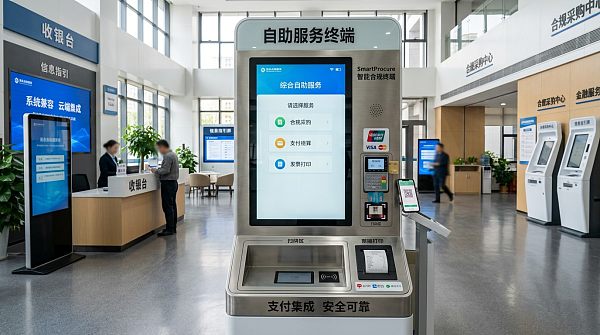
A common buying mistake is selecting an interactive kiosk based on visual design, display size, or promotional features without mapping the actual service scenario. A 21.5-inch indoor self-service unit may perform well in a controlled retail lobby, but the same configuration can fail in a transport hub, hospital entrance, or campus corridor where brightness, durability, and usage frequency are completely different.
Before comparing suppliers, buyers should define at least 4 variables: user volume per day, transaction complexity, installation environment, and expected service life. In practice, a kiosk handling 100–300 daily interactions has very different design needs from one expected to process 1,000+ touches per day. Touch response, enclosure strength, thermal design, and cleaning frequency all matter more than cosmetic styling.
Operators also feel the consequences of poor use case fit faster than procurement teams. If the printer jams every 2 days, the scanner struggles with low-contrast codes, or the touchscreen fails under gloves, the system stops being “interactive” and becomes a manual support burden. That directly increases labor intervention and shortens the business value of the kiosk deployment.
Key scenario questions buyers should answer first
- Will the kiosk be used indoors, semi-outdoors, or outdoors for 8, 16, or 24 hours per day?
- Does the workflow require payment, ID verification, ticket printing, document scanning, or only wayfinding?
- Will the unit support 1 language, 2–3 languages, or multilingual public-facing interaction?
- Is the user group familiar with digital interfaces, or does the design need large icons and guided steps for first-time users?
The table below shows how kiosk specifications should be aligned with actual operating conditions rather than broad product categories.
The buying lesson is simple: define the service model first, then the hardware profile. A kiosk chosen by scenario fit will usually reduce downtime, operator intervention, and avoidable replacement costs within the first 12 months.
Practical specification checkpoints
For most commercial deployments, buyers should verify brightness range, touch technology, CPU performance, peripheral compatibility, and enclosure quality. For example, indoor kiosks often work within 250–500 nits, while brighter environments may require higher visibility. Likewise, a project needing payment, barcode scanning, and camera verification should confirm port availability and middleware support before contract approval.
If the kiosk is expected to operate 16–24 hours daily, ask about component replacement cycles, fan or fanless design, and mean service intervals. Even without quoting brand-specific claims, a serious supplier should explain maintenance expectations in months, not vague promises of “industrial grade” performance.
Mistake 2: Ignoring Compliance, Security, and Data Governance
Many buyers treat compliance as a legal checkbox handled after deployment. That approach is risky, especially when the kiosk processes payment, personal data, health records, student information, or cross-border transactions. If the system collects user identifiers, payment credentials, or cloud-synced logs, security architecture must be reviewed before purchase, not after installation.
At minimum, buyers should ask which standards and controls are relevant to the workflow. ISO-related quality and process discipline, GDPR obligations for personal data handling, and PCI-DSS requirements for payment environments are not interchangeable. A kiosk used only for navigation has a different compliance profile from one that accepts card payment, stores session data, or connects to external financial platforms.
A second mistake is assuming that a compliant payment gateway automatically makes the whole kiosk compliant. In reality, the physical device, operating system hardening, remote management process, user session timeout, encryption method, and support access controls all influence risk. One weak layer can expose the full service chain.
What buyers should verify before signing
- Whether the kiosk processes, stores, transmits, or temporarily caches personal or payment data.
- Whether data is hosted locally, in a private cloud, or through regional cloud infrastructure.
- Whether remote support sessions are logged, time-limited, and permission-controlled.
- Whether software updates follow a documented process with rollback and patch timing.
- Whether session timeout, screen lock, and admin access controls are configurable by policy.
The following comparison helps procurement and operations teams distinguish compliance priorities by kiosk function.
The main conclusion is that compliance review should be tied to workflow design. Buyers who clarify data exposure, payment scope, and support access in the first 2 procurement stages usually avoid the expensive redesigns that happen after legal, IT, and operations discover hidden gaps.
Operational impact of weak compliance planning
When compliance is not built into kiosk selection, consequences often appear as deployment delay, blocked payment activation, restricted cross-border rollout, or forced software replacement. For global or multi-site organizations, even a 4–8 week compliance delay can affect project launch windows, training schedules, and market penetration plans.
That is why information researchers should not only collect brochures. They should ask for architecture explanations, support process descriptions, and deployment documentation that shows how the kiosk behaves in a real operating environment.
Mistake 3: Overlooking Integration With Payment, POS, and Cloud Systems
An interactive kiosk rarely works as a standalone asset. In most sectors, it sits inside a broader service stack that includes POS software, ERP, CRM, queue systems, loyalty tools, payment gateway services, and cloud dashboards. One of the most expensive buying mistakes is approving hardware first and testing integration later.
This problem is especially visible in retail and service environments. A kiosk may technically accept a card reader, but if it cannot pass transaction status correctly to the Smart POS system, inventory and reconciliation errors follow. The same issue appears in education and public service projects when the kiosk front end does not synchronize with the back-end database in real time or within an acceptable delay window.
Procurement teams should request an integration checklist before vendor selection. That checklist should include operating system support, API readiness, middleware compatibility, payment device support, language handling, cloud reporting access, and update management. A project with 3 connected systems is manageable; a project with 6–8 connected layers needs much more disciplined technical review.
Integration areas that should never be assumed
- Payment gateway connection for local and cross-border payments, including settlement flow and failure handling.
- Smart POS compatibility, especially item sync, promotion logic, tax rules, and refund workflows.
- Cloud solution support for remote monitoring, content updates, device health alerts, and usage analytics.
- User authentication integration such as QR code, student ID, member account, or employee directory lookup.
The table below shows common integration failures and how buyers can prevent them during evaluation.
The biggest takeaway is that integration should be proven with workflow testing, not vendor assurance alone. Even a 30-minute demo is not enough. Buyers should request at least 5–10 real transaction scenarios, especially where payment, printing, and back-end status synchronization happen in one user session.
A practical pre-purchase test sequence
For medium and enterprise projects, a 3-step validation path works well: first review architecture, then run lab tests, then conduct a pilot at 1–2 sites. This reduces the chance of discovering software conflicts after a larger rollout. It also gives operators time to identify interface issues, support gaps, and training needs before the full deployment schedule begins.
If a supplier resists pilot validation or cannot describe integration boundaries clearly, that is often a warning sign. A lower upfront price can quickly disappear when reconfiguration, field troubleshooting, and delayed go-live costs are added.
Mistake 4: Underestimating Lifecycle Cost, Service, and Operator Experience
Another frequent mistake is comparing only purchase price while ignoring total lifecycle cost. An interactive kiosk is not just a screen and enclosure. Over 36–60 months, buyers may pay for software licensing, remote device management, spare parts, field service, consumables, cybersecurity patching, and user training. The cheapest unit at purchase can become the most expensive unit in operation.
Operators often see this first. If replacing a printer module takes 2 hours, if a faulty scanner requires full-unit disassembly, or if software updates must be performed one device at a time, service efficiency drops sharply. In multi-site deployments of 20, 50, or 100 kiosks, even small maintenance inefficiencies multiply quickly.
Buyers should ask about support SLAs, spare part availability, remote diagnostics, cleaning requirements, and staff training scope. A serious supplier should be able to explain first-response timing, escalation levels, and whether common issues can be solved remotely within the same business day.
Lifecycle factors that affect real ROI
- Expected maintenance frequency for printer, scanner, touch panel, and payment components.
- Availability of local or regional service support within 24–72 hours.
- Software patch schedule and whether updates can be deployed centrally.
- Training time required for front-line operators, typically 1–3 sessions depending on workflow complexity.
- Consumable and spare part planning for 6–12 months of operation.
The table below helps teams compare visible and hidden cost items during procurement.
A more disciplined procurement process compares total cost of ownership, not unit price alone. In many cases, reducing one service visit per device per quarter can offset a higher initial hardware cost within the first year.
Why operator feedback should influence buying decisions
Information researchers and procurement leaders should include operators in pilot reviews. Operators can identify interface confusion, cleaning challenges, queue bottlenecks, and failure patterns that are invisible in technical spec sheets. A kiosk that saves 20 seconds per transaction but causes frequent resets is not delivering practical efficiency.
For cross-industry deployments, the strongest buying decisions usually come from a 4-party review: procurement, IT, operations, and compliance. That balance helps prevent one-dimensional decisions based only on design, price, or feature count.
How to Build a Safer Interactive Kiosk Buying Process
Avoiding mistakes is easier when buyers follow a structured evaluation path. Instead of asking “Which kiosk is best?”, ask “Which kiosk fits our service flow, compliance profile, system architecture, and support model?” That shift leads to better outcomes in retail, finance, education, healthcare, government service, and multi-site enterprise deployment.
A useful procurement framework can be built in 5 stages: requirement definition, technical review, compliance review, pilot testing, and rollout planning. Each stage should have clear ownership, whether led by procurement, IT, operations, or a mixed project team. Skipping one stage may shorten the timeline by 1–2 weeks, but it often creates months of avoidable correction later.
The goal is not to slow purchasing. The goal is to reduce downstream risk. In a digital transformation program, kiosk buying quality affects customer experience, operator workload, payment reliability, and long-term market scalability. Good procurement discipline protects all four.
Recommended 5-step buying workflow
- Define the scenario in measurable terms: user volume, transaction type, deployment environment, and uptime expectation.
- Map integration requirements across payment gateway, Smart POS, cloud platform, and back-end systems.
- Review compliance scope for ISO-related processes, GDPR exposure, PCI-DSS relevance, and access control design.
- Run a pilot with 1–2 representative sites for at least 2–4 weeks to observe real use patterns.
- Finalize support model, spare part plan, operator training, and scale-up schedule before mass rollout.
FAQ: Questions buyers often ask
How long does a typical interactive kiosk procurement and deployment cycle take? For a standard project, evaluation to pilot may take 2–6 weeks, while multi-site rollout can extend further depending on integration and compliance review. The more systems involved, the more important early testing becomes.
What should be prioritized first: hardware, software, or payment? In most B2B environments, workflow and integration should come first, because hardware only creates value when it fits the software, payment, and service process around it.
Are cloud-managed kiosks always better? Not always. They are often easier to monitor and update, but buyers must review permissions, hosting region, data policy, and support controls carefully. Cloud convenience should never replace governance.
The most successful kiosk projects are those that treat buying as a business system decision, not a hardware purchase. If you are evaluating interactive kiosks for public service, retail, finance, education, or another service-driven environment, a structured assessment can reduce risk, improve usability, and support long-term digital transformation goals. To explore tailored kiosk selection criteria, integration planning, or compliance-focused deployment advice, contact us to get a customized solution, discuss product details, or learn more about practical smart terminal strategies.
Tags
Recommended for You
 How to verify an industrial touch panel supplier is a manufacturerIndustrial Supplier Discovery touch panels guide: Verify factory operations, audit production, and check quality records to find a reliable manufacturer and reduce sourcing risks.Oct 25, 2026Lina Cloud
 OCC Issues Final GENIUS Act Rule Setting Payment Stablecoin FrameworkExplore the OCC’s final GENIUS Act rule for payment stablecoins, including issuer yield restrictions, key compliance questions and what businesses should review before January 2027.Oct 25, 2026Dr. Marcus Fin
 How to choose comparable companies for peer analysis in Latin AmericaPeer Analysis Latin America: Learn how to select comparable companies, assess country risk, and normalize financials to build a defensible peer group and make smarter valuation decisions.Oct 24, 2026Lina Cloud
 Queue Unveils Robotic Pharmacy Kiosk With Capacity for 340 MedicationsQueue’s robotic pharmacy kiosk holds up to 340 medications and offers a 30-second workflow with pill verification. Explore its potential benefits and key procurement considerations.Oct 24, 2026Dr. Hideo Tanaka
 How freight costs affect the delivered bulk ammonium sulfate priceCompare the bulk ammonium sulfate price beyond the plant gate. Discover how freight, handling, and delivery terms affect your total cost—and make smarter buying decisions.Oct 23, 2026Lina Cloud
 Millions of Attempts to Exploit Critical PHP Flaws Force Some Websites OfflineCritical PHP flaws reportedly triggered millions of exploit attempts and website outages. Explore patching priorities, supplier checks and continuity steps to protect online services.Oct 23, 2026Lina Cloud
 How to assess UV test data for tempered glass in outdoor displaysAssess outdoor display UV resistance data for tempered glass with confidence. Learn to compare test conditions, spot weak claims, and choose cover assemblies built for outdoor use.Oct 22, 2026Digital Signage
 Oracle Launches Fusion Claw-Based HR Agent ApplicationOracle’s Fusion Claw-based HR agent application targets complex workflow automation. Explore its potential for HR teams, customization options and key adoption considerations.Oct 22, 2026Lina Cloud
 How to size a dry-type floating fish feed extruder for daily outputSize a dry type floating fish feed extruder for your daily output. Learn to calculate throughput, account for moisture losses, and verify supplier capacity before you invest.Oct 21, 2026Lina Cloud
 SAP Named a Leader in 2026 Gartner Magic Quadrant for Cloud ERP FinanceSAP is named a Leader in the 2026 Gartner Magic Quadrant for Cloud ERP Finance. Explore what this recognition means for vendor evaluation and smarter cloud ERP procurement.Oct 21, 2026Lina Cloud
 How to review SDSs before buying high-temperature antioxidants in bulkPlanning high temperature antioxidants bulk purchases? Learn how to review SDSs, assess handling and thermal hazards, and uncover hidden costs before approving your next order.Oct 20, 2026Marcus Trust
 Illinois Digital Asset Kiosk Operators Refund Over $750,000 Under DAKAIllinois digital asset kiosk operators refund over $750,000 under DAKA. Explore scam refund protections, fee caps, and transaction limits—and learn what they mean for consumers.Oct 20, 2026Dr. Hideo Tanaka
 What capacity roller mill do you need for wheat flour production?Choose the right roller mill for wheat flour by matching capacity to output, extraction rate, and operating hours. Learn how to compare suppliers and avoid costly bottlenecks.Oct 19, 2026Lina Cloud
 How does the required frequency range affect EMC testing costs?EMC test frequency range cost depends on equipment, test methods, and product complexity. Learn how to compare lab quotes, avoid hidden charges, and budget smarter.Oct 18, 2026Marcus Trust
 How digital classrooms shape the education infrastructure marketEducation Infrastructure market analysis reveals how digital classrooms reshape spending on connectivity, software, and support. Explore growth opportunities and smarter investment decisions.Oct 17, 2026Lina Cloud
 How to verify the safe load capacity of HDPE aquaculture modulesVerify the safe load capacity of HDPE aquaculture modules with practical guidance on buoyancy, stability, connections, and long-term performance. Learn what to check before approving loads.Oct 16, 2026Marcus Trust
 How to choose a target country for market penetration in EuropePlan Market Penetration in Europe with confidence. Learn how to compare demand, regulations, competition, and delivery costs to choose the right country for sustainable growth.Oct 15, 2026Lina Cloud
 ISO/IEC 27001:2026 Officially Published for Information Security ManagementISO/IEC 27001:2026: Explore the reported update for cloud CRM, payment gateways and AI-ERP. Discover what to verify before planning certification and procurement changes.Oct 15, 2026Marcus Trust
 How to verify food-grade compliance for wholesale locust bean gumEvaluating locust bean gum wholesale suppliers? Learn how to verify food-grade compliance, check batch reports, and confirm traceability to reduce sourcing risks and buy with confidence.Oct 14, 2026Marcus Trust
 Multi-Jurisdictional Compliance Software: Handling Conflicting RequirementsMulti-jurisdictional compliance software helps teams manage conflicting rules, track decisions, and align controls. Discover practical ways to reduce cross-border launch risks.Oct 23, 2026Marcus Trust
 From Regulatory Updates to Alerts: Multi-Jurisdiction Compliance MonitoringExplore multi-jurisdiction compliance monitoring solutions to turn regulatory updates into actionable alerts, assign clear ownership, and track deadlines and evidence across markets.Oct 22, 2026Marcus Trust
 Data Integrity Compliance Software: Audit Trails, Validation, and Access ControlsEvaluate data integrity compliance software with expert guidance on audit trails, validation, and access controls. Learn what to test before choosing a solution that protects critical records.Oct 21, 2026Marcus Trust
 Data Compliance Tools Explained: Discovery, Classification, and Policy ChecksExplore data compliance tools for discovery, classification, and policy checks. Learn how to assess coverage, validate findings, and choose tools that turn insights into action.Oct 20, 2026Marcus Trust
 What Drives Data Compliance Software Costs Beyond the License Fee?Explore data compliance software costs beyond the license fee, from integrations and training to usage charges. Uncover hidden expenses and compare vendors with confidence.Oct 19, 2026Marcus Trust
 Privacy Software for Compliance Officers: Streamlining Assessments and ApprovalsExplore privacy software for compliance officers to streamline assessments, connect evidence, and track approval conditions. Learn how to reduce review delays and keep decisions audit-ready.Oct 18, 2026Marcus Trust
 Evaluating Privacy Risk Management Software: Scoring and Remediation WorkflowsEvaluate privacy risk management software with practical tests for transparent scoring, accountable remediation, and verified risk reduction. Discover how to choose a platform you can trust.Oct 17, 2026Marcus Trust
 DSAR Compliance Software: Resolving Identity Checks and Missed DeadlinesDSAR compliance software helps streamline identity checks, track legal deadlines, and unblock stalled requests. Discover practical ways to reduce delays and build auditable workflows.Oct 16, 2026Marcus Trust
 Best Enterprise Tools for Cross-Border Video Privacy: What to CompareCompare the best enterprise tools for cross-border video privacy compliance. Explore data residency, access controls, redaction, and retention to choose the right solution.Oct 15, 2026Marcus Trust
 Which Privacy Platforms Support GDPR, CCPA, and Cross-Jurisdiction Workflows?Which privacy platforms support cross-jurisdiction compliance? Compare GDPR and CCPA workflows, data discovery, and audit evidence to shortlist the right solution.Oct 14, 2026Marcus Trust
 Which certifications matter when buying education hardware globally?Which certifications matter when buying education hardware internationally? Explore CE, FCC, safety and sustainability requirements to verify compliance and buy with confidence.Oct 23, 2026Marcus Trust
 What evidence shows an EdTech supplier can provide long-term support?What evidence proves an EdTech supplier can deliver long-term support? Explore service records, SLAs, financial resilience, security updates, and exit plans to choose with confidence.Oct 22, 2026Lina Cloud
 How can procurement analytics reduce school project risk?How can procurement analytics reduce school project risk? Discover how to uncover hidden costs, assess suppliers, protect student data, and keep classroom projects on track.Oct 21, 2026Lina Cloud
 Can a school payment system handle cross-border payments?Can a school payment system handle cross-border payments? Explore currency support, fees, settlement, and compliance checks to choose a solution that simplifies international tuition collection.Oct 20, 2026Dr. Marcus Fin
 What should schools check before choosing a payment gateway?What should schools check before choosing a payment gateway? Discover key security, integration, fee, and settlement checks to simplify collections and choose with confidence.Oct 19, 2026Dr. Marcus Fin
 Does PCI DSS apply when schools accept online payments?Is PCI-DSS relevant when schools accept online payments? Learn how to reduce compliance scope, choose the right SAQ, and verify payment providers to protect your school.Oct 18, 2026Dr. Marcus Fin
 How do you create a regional compliance map for EdTech?How do we create a regional compliance map for EdTech? Explore practical steps to map privacy rules, data flows, accessibility, and launch controls for confident regional expansion.Oct 17, 2026Marcus Trust
 What data privacy risks are common in interactive classrooms?Which data privacy risks are common in interactive classrooms? Explore tracking, weak access controls, and AI data reuse—and learn practical ways to protect students.Oct 16, 2026Lina Cloud
 How often should smart terminals receive security updates?How often should smart terminals receive security updates? Discover practical patch schedules, urgent threat priorities, and safe rollout strategies to protect devices and reduce downtime.Oct 15, 2026Lina Cloud
 What happens to school data when a cloud contract ends?What happens to school data when a cloud contract ends? Learn how to secure usable exports, manage access deadlines, and verify deletion to protect student records and avoid costly exit risks.Oct 14, 2026Professor Sarah Ed
 How Can Buyers Assess Smart Terminal Compatibility Before Purchase?How do we assess smart terminal compatibility before purchase? Discover practical software, peripheral, payment, and security checks to avoid costly integration surprises.Oct 25, 2026Dr. Hideo Tanaka