[FIN]CROSS-BORDERVOL: $4.2T
[SEC]CYBER ALERT: TIER2
[POL]IS0 GROWTH:+14%
[GEO] CLOUDINDEX: +2.4%
Structural Logic
Category Filters
Digital classroom integration examples that improve lesson flow
Lead Author
Published
Views:
Digital Classroom Integration Examples That Improve Lesson Flow
A digital classroom does not become effective simply because it has an interactive display, student devices, and a learning platform. Lesson flow improves when those tools behave like one working environment: the teacher can begin quickly, students know where to find materials, responses appear when they are useful, and no one loses ten minutes moving between logins, cables, applications, and unsupported file formats.
The most useful digital classroom integration examples are therefore operational rather than decorative. They focus on the moments that shape a real lesson: opening a class, sharing a resource, collecting evidence of understanding, changing activity, supporting a student who is absent, and closing the session with a clear record of what happened. For operators, classroom technicians, and teaching support teams, the central question is not “Which device has more features?” It is “What must connect reliably before, during, and after a lesson?”
A connected classroom also needs to work under ordinary conditions, not only during a polished demonstration. Networks become congested, teachers use personal files, students arrive with different device states, and room schedules leave little time for troubleshooting. The examples below show practical ways to reduce that friction while keeping teaching decisions in the hands of educators.
Start with the lesson journey, not the equipment list
A common implementation mistake is to procure individual components first and define the workflow later. An interactive flat panel, wireless casting system, document camera, device-management platform, and assessment application may each perform well on their own. Yet if each requires a separate account, separate update routine, and separate support path, the room can feel more fragmented than a conventional classroom.
Before selecting integrations, map a typical 45- or 60-minute lesson in small steps. Include room entry, display wake-up, teacher sign-in, access to class materials, collaborative work, formative assessment, handover to another teacher, and shutdown. Then identify the handoffs. The handoffs—not the headline features—are where lost time usually accumulates.
For example, a teacher may prepare slides in a cloud workspace, annotate them on a touch display, send a task to student devices, and review a response dashboard. If annotations cannot be saved back to the relevant class folder, or if the assessment tool is outside the institution’s identity system, the lesson contains avoidable breaks. A better design makes the next action visible and predictable.
Example 1: A one-touch classroom start routine
One of the strongest low-complexity integrations links the room display, teacher identity, timetable information, and approved teaching applications. The aim is simple: when the teacher enters the room, the system should present the right class context without requiring a lengthy technical setup.
In a practical arrangement, the teacher authenticates using an institution-managed account or a suitable local sign-in method. The display then opens a controlled launcher with access to the day’s class resources, whiteboard workspace, wireless sharing option, and support contact route. The room does not need to predict every lesson activity. It needs to remove repeated setup tasks while preserving the teacher’s freedom to choose content.
This workflow is especially useful where rooms are shared. It reduces the risk that one person’s files, browser sessions, or saved annotations remain visible to the next class. It also creates clearer boundaries between personal and institutional data. Operators should test what happens when the timetable changes, a substitute teacher is assigned, or the identity service is temporarily unavailable. A fallback method, such as secure guest presentation or a managed local input, prevents a small authentication problem from stopping the lesson entirely.
The operational measure is not merely whether sign-in succeeds. It is whether a teacher can begin teaching within the normal transition period between classes, without needing a technician.
Example 2: Interactive display, document camera, and cloud materials in one teaching surface
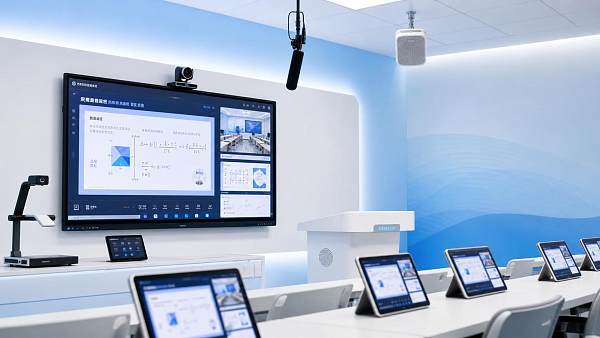
A display becomes more valuable when it can bring together prepared digital content and physical teaching materials without forcing a change of room or a change of pace. A science teacher may need to show a live specimen under a document camera, pause the image, mark it on screen, compare it with a diagram, and save the annotated result for later revision. A vocational instructor may need to demonstrate a component, reference a safety checklist, and capture the finished sequence.
The integration is not complicated in principle, but it must be designed around switching speed. The teacher should be able to move between camera, browser, whiteboard, and connected computer without searching through deep menus. Input labels should match the language used in training. If the room has more than one physical input, cable management and visible connection points matter as much as software settings.

Saving is another overlooked detail. Screenshots, whiteboard pages, and camera captures should follow an agreed destination and retention process. Saving everything locally may be convenient in the moment but makes later retrieval and data control difficult. Automatically exporting every session to a shared drive can create a different problem if sensitive student work is included. Institutions should decide which content is temporary, which is instructional record, and who may access it.
Example 3: Student-device activities that do not interrupt whole-class teaching
Student devices are often introduced to increase participation, yet they can easily split attention if the class must constantly switch between a large display and unrelated browser tabs. A smoother model uses a learning platform as the activity backbone. The teacher posts a task once, students receive it in their class space, and selected responses can be displayed when discussion benefits from them.
Consider a short retrieval activity at the start of a lesson. Students answer a small set of prompts on managed devices. The teacher sees a live overview, identifies a misconception, and decides whether to revisit the topic before moving forward. The point is not to turn every question into a data exercise. It is to make evidence available at the point where a teaching decision is being made.
For this pattern to work, the assessment tool should have a clear relationship with the institution’s classroom or learning-management environment. Duplicate rosters are a warning sign. So are repeated student invitations and activities that cannot be linked back to the relevant class. Where interoperability is limited, a simple, well-documented process can still be preferable to an ambitious integration that fails unpredictably.
Operators should also plan for device exceptions. A student may have a discharged device, a broken browser profile, accessibility requirements, or no network access at that moment. The teacher needs a credible alternative: paired work, a printed response card, a shared classroom device, or a way to contribute verbally. Digital inclusion is partly a support-process issue, not only a hardware decision.
Example 4: Wireless sharing with clear rules for control and privacy
Wireless presentation can make discussion more immediate. Students can show a draft, a group can compare findings, and a guest speaker can present without moving files through a teacher’s account. But open casting arrangements can create disruptions: the wrong screen appears, connection requests pile up, or a device shares notifications and personal content to the whole room.
A workable integration separates convenience from unrestricted access. Teachers should be able to approve requests, stop a session, and choose whether multiple screens may be shown at once. Student sharing may be limited to a designated classroom network or an approved application route. The exact control model depends on age group, institutional policy, and room use, but the rule is consistent: collaboration should not require surrendering control of the teaching display.
This is also where network design becomes visible. Wireless display traffic, cloud resources, device updates, and video conferencing can compete for capacity. A room may appear functional during a quiet test yet struggle when several classes begin streaming at once. Site surveys, access-point placement, VLAN design, and traffic policies generally require local technical assessment; they should not be assumed from a product brochure.
Example 5: Hybrid continuity for absent students and distributed teaching
Hybrid teaching works best when it is treated as a continuity layer rather than a duplicate production studio. In a straightforward setup, the room camera and microphone connect to an approved conferencing service, while the teacher shares the same materials used by students in the room. Remote learners can access tasks and lesson resources through the familiar learning platform rather than receiving a separate stream of attachments.
The difficult part is audio. A high-resolution camera does little good if remote students cannot hear questions, explanations, or peer contributions. Room acoustics, microphone pickup pattern, speaker placement, and echo management should be tested in the actual teaching configuration. A device that works well for a presenter standing at the front may not capture a group discussion around tables.
Recording requires an equally careful decision. Institutions need to establish whether recording is necessary, who can start it, where files are stored, how long they remain available, and how consent or local privacy requirements apply. Data-protection expectations vary by jurisdiction and institution. Compliance should be validated against the applicable rules and contracts rather than inferred from a platform’s general privacy statement.
What operators should verify before scaling
A pilot classroom can hide problems that become expensive across dozens or hundreds of rooms. Before wider deployment, test the operating model as rigorously as the technology. Ask who pushes firmware updates, who manages application versions, who receives fault alerts, and how classroom staff report a problem during an active lesson. A display that needs an on-site visit for every minor issue will create a support backlog regardless of its feature set.
The following checks often reveal whether an integration is ready to scale:
- Can the teacher complete essential tasks when cloud access, wireless casting, or a student device is unavailable?
- Are identity, role permissions, and class rosters managed from a reliable source rather than maintained manually in several systems?
- Does the room support accessibility needs, including captioning options, readable display settings, alternative input methods, and usable audio?
- Are data flows documented for classroom recordings, assessment responses, display accounts, and connected third-party services?
- Can support teams remotely see device status without gaining unnecessary access to teaching content or personal data?
These questions sit at the intersection of education practice, enterprise SaaS administration, smart-terminal management, and compliance oversight. That intersection is increasingly relevant to institutional planners. G-MST’s work across smart education technology, cloud systems, terminal interfaces, and testing or certification intelligence reflects a useful principle: classroom deployments should be assessed as connected service environments, not as isolated screen purchases.
Keep the integration quiet enough for teaching to lead
The best digital classroom integration examples are often unremarkable from the student’s perspective. The display is ready when needed. Materials appear in the expected place. A quick poll informs the next explanation. A document camera supports a demonstration without breaking momentum. When something fails, there is a known fallback and a support route that does not leave the teacher improvising in front of the class.
For a new project, begin with two or three high-frequency lesson workflows and test them in realistic conditions before adding advanced functions. Confirm the identity model, network assumptions, content-storage rules, accessibility requirements, maintenance responsibilities, and relevant data-protection obligations. That discipline usually produces a more usable classroom than chasing the longest feature list—and it gives operators a system they can keep working day after day.
Tags
Recommended for You
 Digital classroom integration examples that improve lesson flowDigital classroom integration examples that improve lesson flow, connect teaching tools, streamline support, and create reliable, engaging learning experiences.Oct 01, 2026Professor Sarah Ed
 Which CE documents should accompany peanut shelling machines?Peanut shelling machines CE guide: learn which documents—Declaration of Conformity, manuals, technical files, and risk assessments—protect imports and compliance.Sep 30, 2026Marcus Trust
 How to verify whether organic Tribulus terrestris extract is certifiedVerify tribulus terrestris extract organic certification with confidence. Learn how to check certificate scope, botanical identity, certifier validity, lot traceability, and processing details.Sep 29, 2026Marcus Trust
 How to prevent uneven feed in a stainless liquid adding machineStainless liquid adding machine feed issues? Learn practical ways to prevent uneven dosing, reduce air leaks, stabilize flow, and improve production consistency.Sep 28, 2026Lina Cloud
 How to verify aquaculture utilities compliance before a site auditAquaculture utilities compliance: learn how to verify water, power, wastewater, alarms, and records before a site audit to reduce risk and prove control.Sep 27, 2026Marcus Trust
 How to size a tunnel oven for a biscuits factory’s target outputTunnel oven for biscuits factory sizing: learn how to match output targets, band loading, bake time, zones, and cooling capacity for reliable production.Sep 26, 2026Lina Cloud
 What purity specifications matter when sourcing bulk magnesium stearate in North America?Bulk magnesium stearate North America buyers: learn the purity specifications that protect quality, compliance, and production performance.Sep 25, 2026Marcus Trust
 How classroom devices can support healthier screen time habitsScreen time classroom devices can build healthier learning habits when lessons balance focus, movement, collaboration, and purposeful digital tasks. Explore practical strategies today.Sep 24, 2026Professor Sarah Ed
 How often should digital signage content refresh for retail displays?Digital signage content refresh rate for retail displays: discover practical schedules for campaigns, pricing, live updates, and customer engagement.Sep 23, 2026Digital Signage
 How to compare wholesale water pumps for farming by flow rateWholesale water pumps for farming factory guide: compare flow rate, total dynamic head, efficiency, and supplier testing to select reliable irrigation pumps.Sep 22, 2026Lina Cloud
 How North America's service-led economy is changing CRM prioritiesService-led Economy North America is reshaping CRM priorities around customer lifecycle, service data, privacy, payments, and connected experiences. Explore practical strategies for smarter CRM investment.Sep 21, 2026Lina Cloud
 What drives carrageenan gum price differences between suppliers?Carrageenan gum price differences reflect grade, dosage efficiency, quality control, certifications, and supply reliability. Compare true landed cost to choose the best-value supplier.Sep 20, 2026Marcus Trust
 How to choose rugged smart terminals for cold storage operationsRugged smart terminals for cold storage: learn how to evaluate batteries, scanning, wireless coverage, glove usability, and durability for reliable operations.Sep 19, 2026Digital Signage
 What makes smart terminals for healthcare suitable for clinical workflows?Smart terminals for healthcare improve clinical workflows with secure integration, hygienic design, reliable connectivity, and lifecycle control. Explore key evaluation factors.Sep 18, 2026Dr. Hideo Tanaka
 What drives pharmaceutical packaging materials price changes?Pharmaceutical packaging materials price changes explained: assess commodity costs, capacity, compliance, logistics, and supplier risk to negotiate smarter.Sep 17, 2026Marcus Trust
 How to vet ODM suppliers using sourcing intelligenceSourcing Intelligence helps you vet ODM suppliers beyond price—verify capabilities, compliance, quality controls, and supply-chain resilience before launch.Sep 16, 2026Lina Cloud
 What drives seafood packaging machine price differences?Seafood packaging machine price differences reflect automation, hygiene, format flexibility, and service scope. Compare costs wisely to improve uptime and pack quality.Sep 15, 2026Marcus Trust
 How to verify a medical equipment certification service before hiringMedical equipment certification service verification guide: check accreditation scope, market recognition, technical competence, report traceability, and contract terms before hiring.Sep 14, 2026Marcus Trust
 What to check before choosing a drip irrigation systems factoryDrip irrigation systems factory checklist: assess quality control, materials, hydraulic performance, compatibility, compliance, and delivery reliability before buying.Sep 13, 2026Lina Cloud
 How to verify that apple cider vinegar powder is food gradeApple cider vinegar powder food grade verification: review identity, COAs, supplier controls, contaminants, legal compliance, and traceability for confident sourcing.Sep 12, 2026Marcus Trust
 What should you verify before choosing a ledger management supplier?Ledger management supplier checklist: verify posting integrity, audit trails, security, integrations, reconciliation, resilience, and exit readiness before you commit.Sep 11, 2026Lina Cloud
 What throughput should a commercial shrimp peeling machine deliver?Shrimp peeling machine commercial factory guide: calculate stable saleable throughput, protect yield, and balance inspection, freezing, packing, and labour capacity.Sep 10, 2026Lina Cloud
 What POS integration should restaurant AI ordering kiosks support?Restaurant AI ordering kiosks need reliable POS integration for menus, payments, kitchen routing, loyalty, and resilient order management. Discover what to require.Sep 09, 2026Dr. Hideo Tanaka
 How to verify the purity of wholesale witch hazel extractWholesale witch hazel extract purity verification: learn how to review CoAs, confirm botanical identity, test contaminants, and strengthen batch traceability.Sep 08, 2026Marcus Trust
 How to choose feed ingredients for aquaculture by digestible proteinFeed Ingredients for aquaculture: learn how to compare digestible protein, amino acids, quality consistency, and real formulation cost for stronger feed performance.Sep 07, 2026Marcus Trust
 What drives the total cost of restaurant AI ordering kiosks?Restaurant AI ordering kiosks: uncover the real costs of hardware, AI software, payments, integration, installation, security, and support before you invest.Sep 07, 2026Dr. Hideo Tanaka
 How can a factory supplier choose the right business intelligence tool?Business intelligence tool factory supplier guide: compare data integration, governance, security, costs, and pilots to choose BI that protects margins and delivery.Sep 05, 2026Lina Cloud
 What should schools check in a smart school API integration?Smart school API integration requires more than connectivity. Discover how to evaluate security, data governance, scalability, reliability, and compliance before approving a solution.Sep 04, 2026Professor Sarah Ed
 What determines Primary Processing pricing for small business card payments?Primary Processing price explained: compare rates, fixed fees, card mix, contracts, and tools to find the most cost-effective payment solution for your small business.Sep 03, 2026Dr. Marcus Fin
 How to choose bulk carrier oils for hair care formulationsBulk carrier oils for hair care: learn how to assess stability, fatty-acid profiles, supplier controls, and packaging compatibility for reliable formulations.Sep 02, 2026Lina Cloud
 How to verify quality when buying wholesale sodium chlorite solutionWholesale sodium chlorite solution: learn how to verify concentration, purity, COAs, packaging, supplier controls, and contract terms for safer, dependable bulk purchasing.Sep 01, 2026Marcus Trust
 What can food processors learn at Agri Processing Middle East?Agri Processing Middle East reveals practical insights on food processing technology, traceability, packaging, quality systems, and resilient regional supply chains.Aug 31, 2026Lina Cloud
 What drives echinacea purpurea extract price differences?Echinacea purpurea extract price: discover how plant part, standardization, testing, certifications, and supply terms shape true ingredient value.Aug 30, 2026Marcus Trust
 What determines the price of commercial neoprene chest waders?Commercial neoprene chest waders price depends on insulation, seams, boots, durability, and order volume. Compare specifications to secure reliable value for demanding work.Aug 29, 2026Marcus Trust
 How to verify barley grass powder for supplements meets safety standardsBarley grass powder for supplements: learn how to verify identity, contaminant testing, traceability, CoAs, and packaging controls for safer sourcing.Aug 28, 2026Marcus Trust
 How to choose bulk carbon black for plastics by dispersion qualityBulk carbon black for plastics: learn how to evaluate dispersion quality, reduce defects and scrap, and select grades that deliver reliable processing, appearance, and value.Aug 27, 2026Lina Cloud
 How specification guides help verify REACH compliance before sourcingSpecification Guides REACH compliance starts with better sourcing checks. Learn how to verify supplier claims, reduce compliance risk, and avoid costly surprises before procurement.Aug 26, 2026Marcus Trust
 What drives bulk laboratory reagents cost when order volume goes upBulk laboratory reagents cost rises or falls with more than volume discounts. Learn how packaging, cold chain, compliance, shelf life, and supplier capacity shape true landed cost.Aug 25, 2026Lina Cloud
 What smart classroom equipment do schools need for hybrid learning?Smart classroom equipment schools need for hybrid learning starts with displays, audio, cameras, and connected platforms. Discover what to buy first and avoid costly mistakes.Aug 24, 2026Professor Sarah Ed
 What to check before choosing a cattle feed processing plant manufacturerCattle feed processing plant manufacturer selection starts with technical fit, quality control, service, and lifecycle cost. Learn the key checks to reduce risk and choose with confidence.Aug 23, 2026Lina Cloud