[FIN]CROSS-BORDERVOL: $4.2T
[SEC]CYBER ALERT: TIER2
[POL]IS0 GROWTH:+14%
[GEO] CLOUDINDEX: +2.4%

Structural Logic
Category Filters
Smart POS Downtime Usually Starts With Small Hardware Decisions
Lead Author
Published
Views:
Smart POS downtime rarely begins with a major system failure—it often starts with small hardware choices that undermine reliability, PCI-DSS Compliance, and operational continuity. For organizations advancing Digital Transformation, every component, from payment readers to connectivity modules, can affect Payment Gateway stability, GDPR Compliance, and long-term service performance. Understanding these hidden risks helps buyers and operators make smarter, lower-risk terminal decisions.
For retail groups, financial service providers, kiosk operators, education planners, distributors, and procurement teams, this issue is not theoretical. A terminal that freezes for 3 minutes during a peak period can create long queues, abandoned transactions, and manual fallback procedures. Repeated interruptions across 50, 500, or 5,000 endpoints quickly turn into a cost, compliance, and reputation problem.
In most cases, the root cause is not a dramatic processor failure or software bug alone. It is often a chain of small decisions: choosing a low-end card reader, ignoring connector durability, underestimating thermal load, selecting the wrong enclosure grade, or treating communications modules as interchangeable. In Smart POS environments, these details shape uptime more than many buyers expect.
This article examines how minor hardware decisions trigger Smart POS downtime, which selection criteria matter most, how cross-functional teams should evaluate risk, and what procurement and operations leaders can do to reduce failure rates over a 3-to-5-year lifecycle.
Why Small Hardware Decisions Create Large Operational Failures
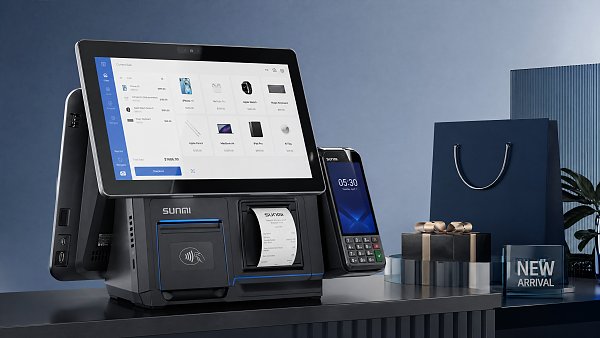
A Smart POS terminal is a service endpoint, not just a device. It supports payment acceptance, user interaction, receipt generation, peripheral communication, network authentication, and often business software integration. When one hardware layer underperforms, the failure can cascade across the transaction path in less than 30 seconds, especially in high-volume environments.
The most common mistake is evaluating components in isolation. A payment reader may pass a bench test, but once combined with an underpowered mainboard, unstable USB interface, or low-grade power supply, transaction latency rises. A delay of 2–5 seconds may seem minor in testing, but in live service it can trigger duplicate taps, timeout errors, and customer assistance calls.
Another overlooked issue is duty cycle. Many buyers compare components based on purchase price rather than expected daily load. A terminal used 80 to 150 times per day behaves very differently from one processing 1,000 transactions, 12 operating hours, and multiple peripheral activations. Hardware rated for light commercial use may fail early when deployed in transportation hubs, quick-service retail, or unattended kiosks.
Typical weak points that start downtime
Small failures usually originate from repeat-stress parts rather than flagship components. Card slots, cable junctions, printer heads, power adapters, antennas, connectors, and cooling paths are among the first areas to degrade. Once degradation begins, service tickets often appear intermittently for 2–8 weeks before full failure is recognized.
- Loose or low-cycle connectors causing peripheral disconnects during busy hours.
- Inadequate thermal design leading to processor throttling or random reboots at 35°C to 45°C ambient temperatures.
- Low-grade power modules producing voltage instability for printers, scanners, and NFC readers.
- Weak wireless modules that perform acceptably in the lab but poorly in dense RF environments.
- Enclosures without sufficient dust or spill resistance in semi-outdoor or food service settings.
The practical lesson for evaluators is clear: uptime should be treated as a hardware architecture outcome, not a single-device feature. Teams that assess terminals only on screen size, CPU, and unit cost often miss the actual causes of recurring downtime.
The Hardware Components Most Likely to Undermine Smart POS Stability
Not all components carry equal operational risk. In Smart POS deployments, a few hardware choices have a disproportionate impact on payment continuity, data integrity, and field maintenance. The table below summarizes the areas that deserve deeper technical review before approval.
The key conclusion is that downtime often begins in interfaces and supporting subsystems. A high-quality display or modern processor cannot compensate for unstable power, poor contactless read behavior, or weak network resilience. That is why technical assessment should focus on transaction path reliability, not only headline specifications.
Reader, printer, and connector decisions matter more than expected
For attended POS, printers remain a major source of service interruptions. Print head wear, cutter jams, and thermal overload increase when receipt volume exceeds design assumptions. In some sectors, moving from 80 receipts to 300 receipts per day changes maintenance intervals from quarterly to monthly. If the printer is embedded deeply, repair time also increases.
Connectors should be assessed by insertion cycle tolerance, locking security, and vibration performance. A cable that disconnects once every 2 weeks can still be expensive if it affects hundreds of stores. Field service cost is rarely just the part price; it includes diagnosis time, operator disruption, support calls, and lost throughput.
Environmental fit is part of hardware quality
Hardware reliability depends on deployment conditions. Indoor climate-controlled environments may tolerate a basic enclosure, but semi-outdoor kiosks, school entrances, canteens, and transport counters often need stronger protection. Dust, humidity, grease particles, and repetitive cleaning cycles can all shorten component life. In many projects, specifying a suitable ingress level and operating temperature range prevents avoidable failures during the first 12 months.
Compliance, Security, and Service Continuity Are Tied to Physical Design
Smart POS hardware decisions are not only about uptime. They also affect PCI-DSS Compliance, data handling controls, physical tamper resistance, and the ability to maintain GDPR Compliance when devices store, cache, or transmit transaction-related information. Hardware that is difficult to secure physically often becomes difficult to govern operationally.
For example, poorly protected ports can create tamper opportunities. Inadequate enclosure design can expose service technicians to improvised repair work that increases compliance risk. Weak storage architecture or improper local logging behavior may also complicate data minimization efforts. What appears to be a simple hardware shortcut can later become a security exception or audit burden.
How hardware choices affect compliance in practice
Compliance teams should review at least 4 hardware-linked areas during evaluation: payment interface integrity, local data exposure, physical access control, and network resilience. If one of these areas is weak, the organization may rely too heavily on procedural controls rather than built-in design safeguards. That approach usually raises lifecycle cost.
- Protected service ports reduce unauthorized access during maintenance and transport.
- Stable network modules lower the frequency of incomplete transaction states and forced offline workflows.
- Power protection improves transaction completion consistency during voltage fluctuation or restart events.
- Modular replacement design helps maintain validated configurations without improvised field modifications.
From a business continuity perspective, a terminal that fails securely but too often is still a problem. Procurement teams need a balance between security architecture and practical serviceability. A sensible target in many B2B projects is to reduce mean time to replace a failed field module to under 20 minutes for attended terminals and under 45 minutes for enclosure-based kiosks.
This is particularly relevant for distributed estates. Across 100 to 1,000 devices, even a small increase in incident frequency can strain support capacity, spare-parts planning, and audit readiness. Secure, maintainable hardware design supports both operational continuity and governance discipline.
A Practical Procurement Framework for Buyers, Evaluators, and Project Teams
Many Smart POS tenders still overemphasize purchase price and underweight lifecycle resilience. A stronger approach is to score vendors and configurations across performance, reliability, compliance fit, serviceability, and total operating cost over 36 to 60 months. This method gives finance approvers and technical teams a common decision structure.
Before approving any terminal, teams should define the real deployment profile: transaction count per day, ambient temperature, expected peripheral mix, cleaning frequency, network conditions, and installation environment. A terminal that fits a boutique store may not fit a hospital kiosk or a campus dining system, even if both process card payments.
Recommended evaluation criteria
The table below offers a decision model that procurement, operations, IT, quality, and security teams can use during supplier comparison. Weightings may vary by sector, but the categories remain broadly useful across retail, finance, education, and service-led environments.
The most important takeaway is that procurement should demand proof under real operating conditions. A 2-hour demo is not enough. For meaningful selection, pilot testing should ideally cover 7–14 days, include network variation, repeated payment cycles, printer load, and at least one restart or recovery scenario.
Questions that improve supplier discussions
- What is the recommended transaction volume per day for this exact configuration?
- Which modules are field-replaceable in under 30 minutes?
- How does the terminal behave during temporary network loss or power fluctuation?
- What spare-parts availability period is supported after purchase?
- Which maintenance tasks must be performed monthly, quarterly, and annually?
These questions help buyers move beyond spec-sheet marketing and toward practical risk control. They also support commercial evaluators who must justify spending decisions to finance and operations stakeholders.
Implementation, Maintenance, and Lifecycle Controls That Reduce Downtime
Even well-selected Smart POS hardware can underperform if deployment discipline is weak. Installation quality, peripheral pairing, firmware alignment, and preventive maintenance all influence stability. In large rollouts, many failures attributed to “device quality” are actually introduced during setup, cabling, or unsupported field modifications.
A strong rollout plan usually has 3 phases: pre-deployment validation, controlled installation, and post-go-live monitoring. Each phase should have measurable checks. For example, pre-deployment may include burn-in tests for 24–72 hours, installation may require cable strain review and payment reader verification, and post-go-live may track incident patterns during the first 30 days.
Lifecycle controls that make a measurable difference
- Standardize terminal images and approved peripheral combinations to reduce unsupported variants.
- Keep critical spares such as readers, power modules, and printers at regional level for faster restoration.
- Schedule cleaning and inspection intervals based on environment, often every 30, 60, or 90 days.
- Track recurring incident codes by site to detect weak connectors, heat stress, or network interference early.
- Retire or refresh terminals before failure patterns accelerate, typically after a planned lifecycle threshold rather than crisis replacement.
Operators also need practical maintenance guidance. Excessive force on ports, incompatible paper supplies, blocked vents, and ad hoc cable replacements are common causes of avoidable downtime. A 15-minute operator briefing can prevent many incidents that would otherwise generate service tickets for months.
Common field mistakes to avoid
Do not mount terminals near direct heat sources without clearance. Do not mix unofficial power adapters across device families. Do not route network and power cables in ways that create tension at connectors. Do not defer intermittent reader or printer issues once they appear; repeated minor faults are often early warnings of larger service disruption within the next 1–6 weeks.
For distributors and project managers, the strategic point is simple: lifecycle governance protects both service quality and margin. Downtime reduction is not only a technical outcome; it is also an implementation discipline.
FAQ: What Buyers and Operators Most Often Ask About Smart POS Hardware Risk
How should buyers choose between lower upfront cost and higher hardware resilience?
Use a 36-to-60-month total cost model. Compare not only unit price, but also expected failure frequency, spare-parts cost, technician visits, transaction interruption risk, and replacement time. A terminal that costs 8% more upfront may still be cheaper if it reduces service events across the full deployment estate.
Which environments need stricter hardware specifications?
High-risk environments include semi-outdoor kiosks, food-service counters, transport hubs, busy self-service areas, and education sites with extended daily use. These scenarios often require stronger thermal tolerance, better sealing, more stable connectivity fallback, and easier field replacement than standard indoor retail counters.
How long should Smart POS pilot testing last before full rollout?
For meaningful validation, a pilot often needs at least 7–14 days in a live or live-like environment. If the terminal will be deployed in high-volume or regulated settings, a longer test of 2–4 weeks is often justified. The goal is to observe heat behavior, transaction consistency, connectivity recovery, and user handling patterns.
What are the first warning signs of hidden hardware weakness?
Watch for delayed tap recognition, random peripheral reconnects, intermittent printer jams, restart anomalies, or failures that disappear after reboot. These are rarely harmless. They usually indicate stress in connectors, power stability, thermal design, or module integration, and should be investigated before the fault rate spreads across more sites.
Smart POS downtime usually begins long before a terminal goes fully offline. It starts with small hardware decisions that seem acceptable during procurement but prove costly in live operations. Payment reader quality, power stability, connectivity resilience, thermal design, serviceability, and environmental fit all influence uptime, compliance posture, and lifecycle cost.
For research teams, technical evaluators, procurement leaders, distributors, and enterprise decision-makers, the most effective strategy is to assess terminals as complete service platforms rather than isolated devices. A disciplined evaluation process, realistic pilot testing, and structured maintenance planning can significantly reduce avoidable disruption.
If you are reviewing Smart POS options, planning a terminal rollout, or comparing hardware configurations for risk, compliance, and long-term supportability, now is the right time to refine your selection criteria. Contact us to discuss project requirements, request a tailored evaluation framework, or explore more Smart Terminal solutions for complex B2B environments.
Tags
Recommended for You
 How to verify that apple cider vinegar powder is food gradeApple cider vinegar powder food grade verification: review identity, COAs, supplier controls, contaminants, legal compliance, and traceability for confident sourcing.Sep 12, 2026Marcus Trust
 What should you verify before choosing a ledger management supplier?Ledger management supplier checklist: verify posting integrity, audit trails, security, integrations, reconciliation, resilience, and exit readiness before you commit.Sep 11, 2026Lina Cloud
 What throughput should a commercial shrimp peeling machine deliver?Shrimp peeling machine commercial factory guide: calculate stable saleable throughput, protect yield, and balance inspection, freezing, packing, and labour capacity.Sep 10, 2026Lina Cloud
 What POS integration should restaurant AI ordering kiosks support?Restaurant AI ordering kiosks need reliable POS integration for menus, payments, kitchen routing, loyalty, and resilient order management. Discover what to require.Sep 09, 2026Dr. Hideo Tanaka
 How to verify the purity of wholesale witch hazel extractWholesale witch hazel extract purity verification: learn how to review CoAs, confirm botanical identity, test contaminants, and strengthen batch traceability.Sep 08, 2026Marcus Trust
 How to choose feed ingredients for aquaculture by digestible proteinFeed Ingredients for aquaculture: learn how to compare digestible protein, amino acids, quality consistency, and real formulation cost for stronger feed performance.Sep 07, 2026Marcus Trust
 What drives the total cost of restaurant AI ordering kiosks?Restaurant AI ordering kiosks: uncover the real costs of hardware, AI software, payments, integration, installation, security, and support before you invest.Sep 07, 2026Dr. Hideo Tanaka
 How can a factory supplier choose the right business intelligence tool?Business intelligence tool factory supplier guide: compare data integration, governance, security, costs, and pilots to choose BI that protects margins and delivery.Sep 05, 2026Lina Cloud
 What should schools check in a smart school API integration?Smart school API integration requires more than connectivity. Discover how to evaluate security, data governance, scalability, reliability, and compliance before approving a solution.Sep 04, 2026Professor Sarah Ed
 What determines Primary Processing pricing for small business card payments?Primary Processing price explained: compare rates, fixed fees, card mix, contracts, and tools to find the most cost-effective payment solution for your small business.Sep 03, 2026Dr. Marcus Fin
 How to choose bulk carrier oils for hair care formulationsBulk carrier oils for hair care: learn how to assess stability, fatty-acid profiles, supplier controls, and packaging compatibility for reliable formulations.Sep 02, 2026Lina Cloud
 How to verify quality when buying wholesale sodium chlorite solutionWholesale sodium chlorite solution: learn how to verify concentration, purity, COAs, packaging, supplier controls, and contract terms for safer, dependable bulk purchasing.Sep 01, 2026Marcus Trust
 What can food processors learn at Agri Processing Middle East?Agri Processing Middle East reveals practical insights on food processing technology, traceability, packaging, quality systems, and resilient regional supply chains.Aug 31, 2026Lina Cloud
 What drives echinacea purpurea extract price differences?Echinacea purpurea extract price: discover how plant part, standardization, testing, certifications, and supply terms shape true ingredient value.Aug 30, 2026Marcus Trust
 What determines the price of commercial neoprene chest waders?Commercial neoprene chest waders price depends on insulation, seams, boots, durability, and order volume. Compare specifications to secure reliable value for demanding work.Aug 29, 2026Marcus Trust
 How to verify barley grass powder for supplements meets safety standardsBarley grass powder for supplements: learn how to verify identity, contaminant testing, traceability, CoAs, and packaging controls for safer sourcing.Aug 28, 2026Marcus Trust
 How to choose bulk carbon black for plastics by dispersion qualityBulk carbon black for plastics: learn how to evaluate dispersion quality, reduce defects and scrap, and select grades that deliver reliable processing, appearance, and value.Aug 27, 2026Lina Cloud
 How specification guides help verify REACH compliance before sourcingSpecification Guides REACH compliance starts with better sourcing checks. Learn how to verify supplier claims, reduce compliance risk, and avoid costly surprises before procurement.Aug 26, 2026Marcus Trust
 What drives bulk laboratory reagents cost when order volume goes upBulk laboratory reagents cost rises or falls with more than volume discounts. Learn how packaging, cold chain, compliance, shelf life, and supplier capacity shape true landed cost.Aug 25, 2026Lina Cloud
 What smart classroom equipment do schools need for hybrid learning?Smart classroom equipment schools need for hybrid learning starts with displays, audio, cameras, and connected platforms. Discover what to buy first and avoid costly mistakes.Aug 24, 2026Professor Sarah Ed
 What to check before choosing a cattle feed processing plant manufacturerCattle feed processing plant manufacturer selection starts with technical fit, quality control, service, and lifecycle cost. Learn the key checks to reduce risk and choose with confidence.Aug 23, 2026Lina Cloud
 How to verify quality control before choosing an aquaculture gear exporterAquaculture gear exporter selection starts with quality control. Learn how to verify traceability, testing, process discipline, and export reliability before you buy.Aug 22, 2026Marcus Trust
 When do chemical manufacturing systems need built-in batch traceabilityChemical Manufacturing systems need built-in batch traceability when audits, deviations, recalls, and safety risks demand fast proof. Learn the signs before manual records fail.Aug 21, 2026Lina Cloud
 How to verify an environmental testing laboratory factory meets ISO standardsEnvironmental testing laboratory factory verification starts with ISO/IEC 17025 accreditation, scope, traceability, and reporting checks. Learn the key audit points before you choose a lab.Aug 20, 2026Marcus Trust
 When does customer engagement retail technology pay off for stores?Customer engagement retail technology pays off when it solves real store friction, improves queues and service, and delivers measurable value. Learn when to invest.Aug 19, 2026Lina Cloud
 When do nearshore seaweed farming lines make sense over offshore systems?Seaweed farming lines nearshore often make more sense than offshore systems when access, maintenance, permitting, and cost control matter most. See when nearshore delivers smarter, lower-risk project execution.Aug 18, 2026Marcus Trust
 How fast is a high speed currency counting machine in daily cash handling?High speed currency counting machine speeds up daily cash handling, improves accuracy, and reduces downtime—see what really makes it fast enough for busy operations.Aug 17, 2026Dr. Marcus Fin
 PBOC Overnight Reverse Repo Adds Liquidity Support for POS Terminal ExportersPBOC overnight reverse repo boosts liquidity for POS terminal exporters, easing funding pressure and supporting steadier overseas shipments.Aug 17, 2026Dr. Marcus Fin
 How regulatory shifts in medical device software affect compliance planningMedical device regulatory shifts news is reshaping software compliance planning—learn how to stay audit-ready, reduce delays, and protect market access.Aug 16, 2026Marcus Trust
 New Direct Sea Route to the UAE Improves Export Lead Times for POS and Smart HardwareNew direct sea route to the UAE shortens export lead times for POS and smart hardware by 5–7 days, improving delivery stability, customs coordination, and rollout efficiency.Aug 16, 2026Dr. Marcus Fin
 How to choose the right OEM information kiosk manufacturerinformation kiosk manufacturer OEM factory guide: learn key checks for design, quality, compliance, and serviceability to choose the right partner with confidence.Aug 15, 2026Dr. Hideo Tanaka
 China to Fully Implement Cross-Border Cash Pooling for Multinationals on September 14Cross-border cash pooling in China starts nationwide on September 14, helping multinationals centralize funds, improve liquidity, and streamline cross-border settlement.Aug 15, 2026Dr. Marcus Fin
 Erythritol Powder Bulk: What Zero-Calorie Claims Mean for Product LabelsErythritol powder bulk zero calorie claims can be tricky—learn what labels must prove, what buyers should verify, and how to avoid compliance risks.Aug 14, 2026Marcus Trust
![]() Chinese Customs adjusts ammonium sulfate export inspection rulesChina customs adjusts ammonium sulfate export inspection rules from July 16, 2026. Learn how mandatory inspection will affect declarations, shipping timelines, documents, and global buyers.Aug 14, 2026Marcus Trust
Chinese Customs adjusts ammonium sulfate export inspection rulesChina customs adjusts ammonium sulfate export inspection rules from July 16, 2026. Learn how mandatory inspection will affect declarations, shipping timelines, documents, and global buyers.Aug 14, 2026Marcus Trust How to Evaluate a Mobile Payment Distributor for Coverage, Fees, and SupportMobile payment distributor evaluation made practical: learn how to compare coverage, fees, and support to reduce risk, control costs, and choose a partner that scales with your business.Aug 13, 2026Dr. Marcus Fin
 EU Sets PCI-DSS 7 and Android 14/15 as POS Entry RequirementsEU Sets PCI-DSS 7 and Android 14/15 as POS Entry Requirements: learn how the new EU compliance rule may reshape POS certification, procurement, upgrades, and market access plans.Aug 13, 2026Dr. Marcus Fin
 How to Compare a Digital Whiteboard Display Panel for Classroom UseDigital whiteboard display panel comparison for classrooms: learn how to evaluate touch, brightness, software compatibility, durability, and support to choose the right solution with confidence.Aug 12, 2026Professor Sarah Ed
 EC Sets Dual POS Certification Rule for EU SalesEC Sets Dual POS Certification Rule for EU Sales: learn how PCI-DSS 4.0+ and ISO/IEC 30107-3 requirements will impact POS manufacturers, importers, distributors, and EU market access.Aug 12, 2026Dr. Marcus Fin
 How to Evaluate an Automated Marketing Software Supplier for CRM Integration and ReportingAutomated marketing software supplier evaluation starts with CRM integration and reporting trust. Discover how to assess data sync, analytics integrity, compliance, and supplier reliability.Aug 11, 2026Lina Cloud
 EU Sets Dual Compliance Rule for POS HardwareEU Sets Dual Compliance Rule for POS Hardware: learn how PCI-DSS v4.0 and ISO/IEC 30107-3 Level 3 will reshape EU market access, listings, and procurement before November 2026.Aug 11, 2026Dr. Marcus Fin